Dashboard Navigation Basics
The Spate dashboard is designed to help you move from trend discovery → understanding → action.
This guide walks through the main areas of the platform and how they connect to the Trend Lifecycle framework.
How to Navigate Spate
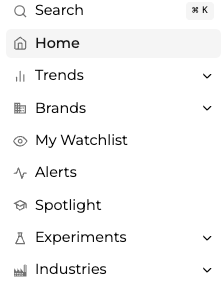
The left-hand navigation is your primary way to explore trends, brands, and industries.
Each section serves a different purpose depending on what you’re trying to do.
Trends
The Trends section is where you explore consumer behavior and emerging signals.
You can view trends by:
- By Category → Explore trends within a specific category
- Hashtags → Analyze social-driven trends
- Ingredients → Dive into ingredient-level insights
- And More → Identify key insights in related categories
This is the primary place to understand:
What is trending and where it sits in the lifecycle
Brands
The Brands section helps you understand who is winning within trends.
You can explore brands by:
- By Category → Brand performance within a category
- Hashtags → Brand presence in social conversations
- Posts → Brand-related content and activity
Use this section to:
- Evaluate competitive landscape
- Track brand momentum
- Identify emerging or declining players
My Watchlist
The Watchlist allows you to track specific trends, brands, or categories over time.
Use it to:
- Monitor important trends
- Stay updated on changes
- Keep key insights easily accessible
- Analyze competitors
Alerts
The Alerts section helps you stay informed automatically.
You can set alerts for:
- Emerging trends
- Specific categories or brands
Alerts ensure you don’t miss important shifts without constantly checking the dashboard.
Spotlight
Spotlight highlights curated insights and notable trends identified by Spate.
Use it to:
- Quickly understand key market shifts
- Discover high-impact trends
- Stay informed on what matters most
Experiments
The Experiments section includes new and evolving features.
Currently available:
- Reddit Insights → Explore early consumer conversations and emerging signals from community-driven platforms
This section reflects Spate’s expansion into new data sources and methodologies.
Industries
The Industries section provides a top-down view of trends within a specific market.
Available industries include:
- Beauty
- Personal Care
- Wellness
- Home & Pet
- Cultural Shifts
- Grocery
- Beverages
- Culinary
- Occasions
Use this section to:
- Understand category-level trends
- Compare performance across industries
- Identify macro-level opportunities
- Understand the shifts happening within a category
How This Connects to the Trend Lifecycle
Each section of the dashboard supports a different part of the workflow:
- Trends → Identify lifecycle stage
- Brands → Understand competitive dynamics
- Industries → See category-level shifts
Together, these views help you move from:
Discovery → Interpretation → Action
Search
Use the search bar or ⌘K to quickly find:
- Trends
- Brands
- Ingredients
- Categories
This is the fastest way to navigate directly to a specific topic.
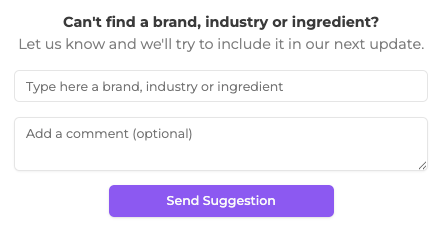
Suggesting Feedback
If you can’t find a trend, brand, or category, you can submit a request directly in the platform.
You’ll see a prompt that allows you to:
- Enter the missing trend, brand, or ingredient
- Add optional context
- Submit feedback to the Spate team
Spate reviews all submissions and uses this feedback to:
- Improve coverage
- Add new trends
- Refine data accuracy
This helps ensure the platform continues to reflect real-world consumer behavior.