
Setting Up Alerts
Alerts deliver a curated digest of the trends that matter most to your brand — no manual research required.
What It Does
Each week, Spate adds 750+ new TikTok hashtags to its dataset and automatically surfaces only the ones relevant to your brand — helping your team stay ahead of emerging conversations and consumer behavior. Pop Index data is also included, giving you a cross-platform view of trend momentum beyond TikTok alone.
Creating an Alert
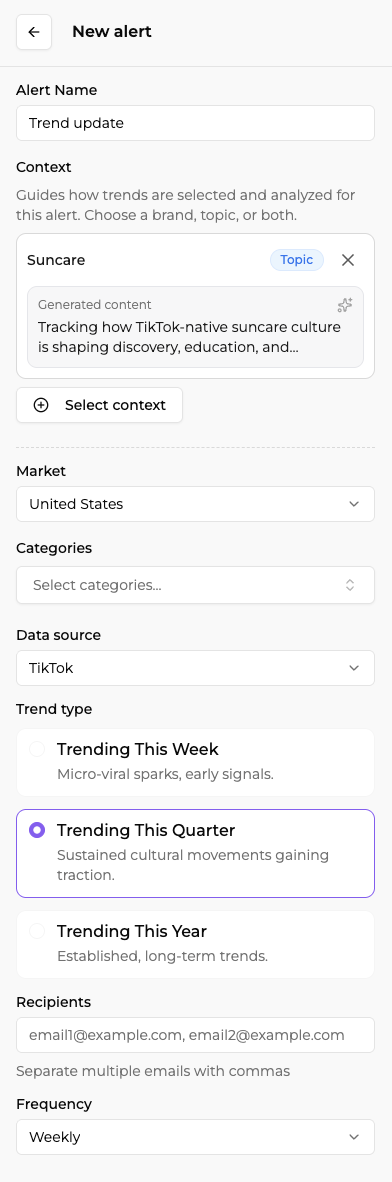
Spate uses the context you select or create to match your brand or topic against trending hashtags and signals. Using AI, we generate a "Context Preview" for each context — for a brand, this highlights core products, themes, ingredients, and focus areas; for a topic, it captures scope and the signals to prioritize. Each Context Preview can be edited to make sure your Alert is precisely calibrated before it goes live. Spate then refreshes trending data weekly or monthly and matches it to your context, surfacing only the most relevant trends.
Each week or month, Spate refreshes trending data and matches it to your Context, surfacing only the most relevant trends.
- Add a context (or multiple). You can now create and reuse saved contexts across multiple alerts instead of re-entering the same information each time. You can combine context types within a single alert — for example, a brand + topic — and update a context once to have changes apply automatically across all alerts using it.
- Add instructions. Fine-tune your Alerts in the context overview by adding notes on especially relevant (or irrelevant) trends and details about your role or priorities.
- Choose your focus categories. Select the categories you want Alerts for — e.g., skincare, lip care, wellness, bath & body, or culture. These can be adjusted anytime.
- Choose the data source.
- TikTok — best for tracking hashtag-level activity and fast-moving social conversations.
- Pop Index — best for a cross-platform view of trend momentum combining TikTok, Google, and Instagram signals.
- Choose the trend type depending on the data source selected.
- For TikTok:
- Trending this week: micro-viral sparks, early signals.
- Trending this quarter: sustsained cultural movements gaining traction.
- Trending this year: established, long-term trends.
- For Pop Index:
- Early: Specualtive, high reward trends before the mass market catches on.
- Growth: trends to watch. One the rise and headed for mainstream.
- Mainstream: Category drivers with massive awareness and no sign of slowing.
- Add your recipients. Include anyone from your team or organization who should receive the Alert.
- Receive your alert email. Each email includes curated relevant trends, why they matter, how your brand can activate or respond, and key drivers of growth.
Why It Matters
Alerts help brand teams cut through the noise by surfacing only the trends that directly align with their brand and category. By automatically identifying emerging signals early, Alerts give teams more time to act on fast-moving conversations and plan data-backed content, campaigns, and product ideas. The weekly or monthly email format makes it easy to share insights internally, ensuring alignment without manual research or constant platform monitoring.
FAQ
What platforms are covered? Alerts track TikTok hashtag data and now also incorporate Pop Index signals, giving you a richer, cross-platform view of trend momentum.
What markets are included? Alerts now support the United States, United Kingdom, France, Japan, Korea, and Global. Additional markets may be added in the future.
How frequently are Alerts sent? Alerts can be sent weekly or monthly — set the frequency that fits your workflow. Weekly alerts are based on newly refreshed hashtag data; monthly alerts are available for tracking slower-moving spaces or getting a higher-level pulse.
Can I change my categories or brand territory? Yes. You can update your categories, contexts, or brand inputs at any time.
Can I track multiple brands? Yes, simply configure an Alert for each brand you manage. With saved contexts, you can also reuse brand inputs across multiple alerts without re-entering information.
Can my team receive the alerts too? Yes, Alerts can be sent to multiple recipients.
Do I need to select at least one category? Yes, at least one category is required when creating an alert.
Can I test an Alert before it goes live? Yes. Before saving, you can send a test version to yourself only or to your full recipient list, so you can confirm exactly what everyone will receive. You'll always get your own copy of the test either way.