
Spate AI
 Overview
The Spate AI Assistant transforms how you interact with trend data.
Instead of navigating dashboards manually, you can use simple, natural language to explore trends, understand categories, and uncover insights instantly.
The Assistant acts as your personal data analyst, helping you navigate the beauty, wellness, and consumer landscape through conversation.
When you open the Assistant, use-cases help you find the right starting point. Use cases are organized into:
- Discovery — surface new trends and emerging signals
- Marketing — explore activation angles and content opportunities
- Strategy — analyze category positioning and competitive dynamics
Selecting a use case automatically populates the prompt composer, making it easy to explore advanced workflows without starting from scratch
What the AI Assistant Does
The AI Assistant leverages Spate’s data to provide a unified view of consumer interest across categories, brands, and trends.
It allows you to:
- Ask questions in plain language
- Instantly analyze categories and trends
- Identify growth drivers
- Navigate directly to relevant dashboards
Key Capabilities
Natural Language Queries
Ask questions the way you think:
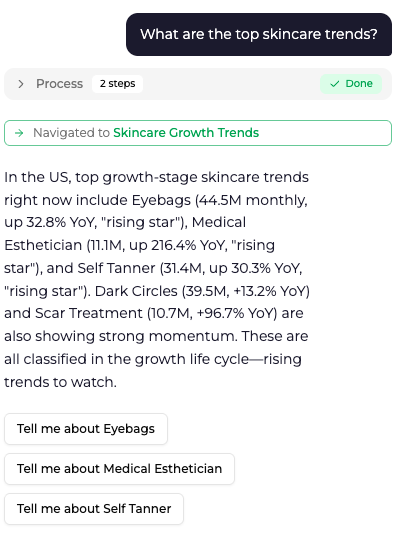
- “What are the top growing trends in skincare?”
- “What ingredients are driving growth in serums?”
- “Which brands are leading in sunscreen?”
The Assistant translates your question into structured analysis using Spate data.
After each answer, the Assistant surfaces suggested follow-up questions helping to further drill into a leading brand, subcategory, ingredient, or related angle so you can continue the research trail with one click.
Identify Growth Drivers
Quickly understand what is driving a trend, including:
- Ingredients
- Product formats
- Benefits
- Concerns
- Subcategories
- Hashtags
This helps you move from:
Trend identification → Trend understanding
Global Coverage
The Assistant supports all markets.
To get the most accurate results, specify a market in your query when relevant.
Example:
- “What are the top trends in haircare in the US?”
Seamless Navigation
The Assistant provides direct links to relevant dashboard pages, allowing you to:
- Move from insight → deep dive
- Validate findings
- Explore data further
How to Use the AI Assistant
The most effective way to use the Assistant is through a step-by-step research workflow.
Start broad, then narrow into specifics.
Step 1: Understand the Category Landscape
Begin with a broad question to identify top trends within a category.
Example Prompt:
What are the top growing trends in face products?
What Happens:
The Assistant analyzes Popularity Index data across subcategories and identifies key growth areas.
You’ll get:
- Top-performing trends
- Growth patterns (e.g., sustained risers)
- Links to explore further in the dashboard
Step 2: Identify Growth Drivers
Once you identify a trend, understand what is driving it.
Example Prompt:
What are the top growing ingredients for vitamin serum?
What Happens:
The Assistant shifts focus to underlying drivers and highlights:
- Key ingredients fueling growth
- Relative performance and trends
- Direct links to related insights
Step 3: Analyze Market Leaders
Next, understand who is winning in the space.
Example Prompt:
What are the top brands for vitamin C serum?
What Happens:
The Assistant identifies:
- Leading brands by popularity
- Growth dynamics (who is gaining vs. declining)
- Competitive landscape insights
- Links to brand-level dashboards
How It Fits Into Your Workflow
The AI Assistant is designed to support the full research process:
- Discover trends → Identify what is growing
- Understand drivers → Learn why it is growing
- Analyze competition → See who is winning
- Deep dive → Explore in the dashboard
It works alongside the Trend Lifecycle framework to help you move from:
Data → Insight → Action
Best Practices
- Start broad, then refine your queries
- Ask follow-up questions to go deeper
- Specify a category, trend, or market when possible
- Use provided links to validate and explore
Key Takeaway
The Spate AI Assistant helps you:
- Navigate complex data instantly
- Understand trends faster
- Identify opportunities more efficiently
It turns the platform into a conversational research tool, allowing you to go from question to insight in seconds.